Core Jigsaw Mechanics
Anime Wolf Jigsaw Puzzles uses the standard mechanics of a digital jigsaw puzzle. A complete image is divided into many interlocking pieces, and the player's objective is to reassemble those pieces into the original picture. The challenge comes from matching both the shape of each piece and the printed artwork on its surface.
What the piece count means
The description mentions 500+ puzzle pieces. In practical terms, that suggests a puzzle large enough to require sorting and planning, but still manageable in a single sitting or a few short sessions. Higher piece counts usually increase the number of similar-looking fragments, especially in areas like the floral background.
Visual anchors in the artwork
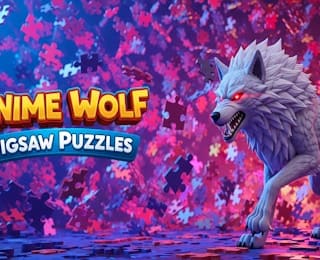
The anime wolf image provides several useful mechanical cues. The wolf's pale fur contrasts with the darker, saturated flowers behind it. The red eyes are small, high-contrast features that can help confirm orientation. The petals and leaves create repeating color clusters, which can be both helpful and tricky because many pieces may look similar at first glance.
Completion-focused play
The available information does not describe competitive scoring, timed rounds, or special abilities. The meaningful mechanic is completion: place pieces correctly until the full anime wolf picture is restored. That makes the game approachable for casual players and satisfying for puzzle solvers who enjoy steady visual progress.
Step-by-Step Approach
- Open the puzzle and study the full image. Before moving pieces, look at the completed anime wolf artwork if the game shows a reference. Notice the major zones: wolf head, body, red eyes, pale fur, dark outlines, and the pink-purple floral background.
- Separate edge pieces first. In most jigsaw puzzles, border pieces have one straight side. Set them aside and use them to outline the rectangle or frame, if the game supports free placement.
- Sort the remaining pieces into broad groups. Create piles for white and gray fur, red eye details, dark shadow lines, bright pink petals, purple petals, and blue background areas. Sorting reduces visual noise before assembly begins.
- Build the most recognizable area. The wolf's face is often easier to anchor than the background. Start with the eyes, nose, mouth, or ear shapes because these features have distinct colors and contours.
- Connect fur sections outward. Once part of the wolf is stable, extend the body and legs by matching gradient tones and line art. Use adjacent colors rather than isolated piece shapes when the artwork is subtle.
- Fill the floral background in clusters. The petals and leaves can be assembled as smaller islands. Match similar petal edges, then attach those islands to the wolf outline and to the frame.
- Check the final borders and loose pieces. Near the end, compare remaining pieces against empty spaces by color, brightness, and line continuity. A piece may fit shape-wise but still be wrong if the printed art does not align.
Practical notes
Because the exact interface is not fully documented, treat these steps as a universal jigsaw workflow. If the game provides snapping, zoom, rotation, or hint tools, use them to support the same sequence: inspect, sort, anchor, expand, and verify. The goal is to reduce random trial and error by giving each piece a visual neighborhood before it is placed.