






| Question | Answer |
|---|---|
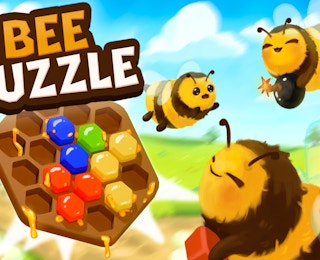
| What is Bee Puzzle? | A Tetris-inspired honeycomb matching game from Hive Studios. |
| Is it free? | Yes, it is described as a free online browser game. |
| How many levels are there? | More than 100 levels with escalating challenges. |
| What is the main mechanic? | Matching honeycombs on a hex grid with power-up support. |
| Can I play on mobile? | It is a browser game; play depends on the device and browser. |

Bee Puzzle FAQ-Bee Puzzle: Honeycomb Match
Similar Games
Bee Puzzle is described as a free online game with unlimited access. It runs in a browser, so you do not need a separate game download based on the available information. The host page controls the game embed, and device compatibility may vary.
On mobile, a modern browser and a stable connection are recommended. If the game does not fit the screen, try rotating the device or using the host page fullscreen option if one is available. The provided information does not confirm native app versions.
How do matches work?
You match honeycombs on a hex grid. The exact placement and clearing rules are shown in the game interface.
Are there power-ups?
Yes. The game features unique power-up mechanics, but the published description does not list their names or effects.
Is there a timer?
The available information does not mention a timer. Check each level screen for the objective and any time limit.
What happens if the board fills?
A full or blocked board usually ends or limits a level in this style of puzzle. The exact failure condition is shown in-game.
How many levels are there?
More than 100 levels are included, with escalating challenges.
Are levels unlocked in order?
The game information does not specify the unlock system. Follow the level select or progression screen shown in the game.
Is progress saved?
Cloud saves and account progress are not confirmed. Browser storage or host behavior may affect saved progress, so check the game page if progress matters to you.
If Bee Puzzle does not load, refresh the page, check your internet connection, and try a different modern browser. If the board or buttons do not respond, tap or click once and wait for the game to register the input before trying again.
On mobile, close other tabs if the game stutters. On desktop, make sure the browser is not blocking the game embed. The provided information does not list specific known bugs, so contact the host site if a persistent error prevents play.