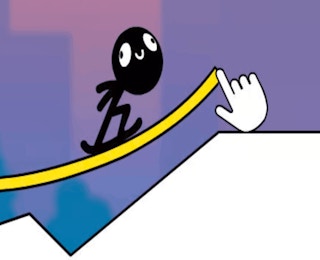
At its core, Draw Surfer asks you to solve a course by drawing the route the surfer will follow. The process is simple to learn but difficult to master because the quality of your line determines the quality of the ride.
Basic loop
- Observe the terrain, obstacles, and starting position.
- Sketch a continuous path that connects the surfer to the safest route forward.
- Let the surfer follow the drawn line.
- Review the result and adjust the shape, angle, or length of the path.
- Repeat until the run is clean.
The key is to think of the drawing as a track, not just decoration. A smooth, well-angled line can carry the surfer over gaps and around hazards, while a rushed doodle may cause a fall. Success comes from planning the route before the pen or cursor touches the play area.
Draw Surfer uses direct drawing input. On desktop, click or press and drag with a mouse or trackpad to create the path. On touch-enabled setups, a finger or stylus can be used when the browser supports that input. The visible hand cursor in the game art reflects this sketch-first interaction.
- Draw: press and drag to lay down the route.
- Refine: revise the stroke before or between attempts as the level flow allows.
- Retry: restart or redraw after an unsuccessful run to test a new line.
Because the control scheme is minimal, precision matters more than speed. Short, deliberate strokes usually produce cleaner paths than fast, shaky scribbles. The player's main skill is not button timing, but steady line creation.
The rules are easy to summarize: guide the surfer through the level by drawing a usable path. The surfer is not steered with arrows or joysticks; the route itself is the control input. To succeed, the path must keep the character moving through the course without colliding with obstacles or losing balance on difficult terrain.
- The drawn line acts as the surfing surface or guide rail.
- Obstacles and terrain shapes constrain where the path can safely go.
- A failed run usually means the route was poorly shaped, too steep, or badly aligned.
- Clean runs come from planning the line before drawing it.
There is no need to memorize complex commands. The challenge is spatial: translate the level layout into a smooth path that the physics simulation can follow reliably.
The main mechanic is drawing-to-motion conversion. Your sketch becomes the physical route, and the surfer's movement depends on the line's geometry. Curves, slopes, jumps, and flat sections all influence momentum and stability.
Path shape matters
Gentle arcs help maintain speed, while sharp angles can jolt the surfer. Long straight sections can be useful for control, but they may not clear obstacles. The best routes often combine climbing, gliding, and landing zones in a readable sequence.
Physics creates the puzzle
Because the game uses satisfying physics, small changes in angle or curvature can change the outcome. The surfer's momentum carries it forward, so a path that looks correct visually may still fail if it does not support the character's speed and balance.
Iterative testing
Levels encourage trial and error. Each attempt teaches how the terrain interacts with your line, letting you refine the route into a more reliable solution.