






Play Rotate Puzzle: Jigsaw Twist Online-Rotate Puzzle: Jigsaw Twist
Similar Games


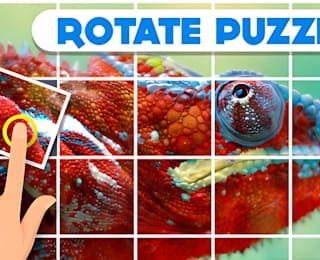
The primary control in Rotate Puzzle: Jigsaw Twist is a pointer interaction with the puzzle grid. Based on the game presentation, players select a tile and rotate it into a different orientation. On a desktop browser this is typically a mouse click, while on a touchscreen device it is a tap. The important principle is that each interaction affects one piece at a time, allowing players to test orientations and gradually restore the image.
Desktop controls
On a computer, move the cursor over the grid and click the piece you want to turn. Watch how the tile changes after the first interaction. If the piece rotates one step, continue applying the same action to nearby tiles until the image begins to align. Because the puzzle is grid-based, precise clicking matters: accidental clicks on neighboring tiles can disrupt a section you have already solved.
Touch controls
On phones and tablets, tap a tile with a finger. Use deliberate taps rather than swipes unless the interface explicitly indicates another gesture. The available information describes rotation as the core action, so the safest assumption is that a simple tap or click is the main input. If a device has touch sensitivity issues, zoom the browser page if your device allows it, then tap more carefully.
Learning the rotation step
The exact rotation increment is not specified in the short game description. Some rotate puzzles use quarter-turn steps, but players should confirm the behavior inside the game before planning a full solve. A practical method is to choose one visually distinct piece, rotate it once, and observe whether the image becomes more or less coherent. That single test teaches the control rhythm and helps prevent random turning.
Control habits that reduce errors
- Click or tap one piece at a time instead of sweeping across the grid.
- Pause after each rotation to compare the piece with its neighbors.
- Keep a mental note of pieces that already look correct.
- Avoid rapid repeated taps unless you intend to cycle through orientations.
For a broader session plan, see the gameplay guide below. For rule-level detail, visit the how to play page.
A productive gameplay session in Rotate Puzzle: Jigsaw Twist combines quick orientation with methodical piece correction. Because the game offers 25+ grid challenges, players can treat early grids as practice for visual scanning and later grids as tests of patience and consistency. The goal is not merely to click pieces until the image looks right, but to develop a repeatable routine that reduces wasted rotations.
Start with a full-grid scan
Before rotating anything, spend several seconds studying the entire board. Look for obvious anchors: an eye, a bright patch, a straight border, a repeating texture, or a strong color boundary. These landmarks give the puzzle a reference frame. If the image is photographic, faces, animals, objects, and horizons are usually easier to interpret than abstract gradients.
Identify pieces that already appear correct
Not every tile may be misaligned. Find pieces whose edges already match neighboring colors or shapes. Treat them as fixed points. Once a few correct pieces are recognized, the rest of the grid becomes easier to reason about because each unknown tile has at least one reliable neighbor.
Work from anchors outward
An effective routine is to solve one small region completely before moving on. Start with the most distinctive anchor, rotate adjacent tiles until their seams match, then expand the solved area. This prevents the common problem of fixing one part of the image while accidentally breaking another.
Check seams, not just centers
Puzzle pieces are often judged by their middle texture, but the real solution lies at the boundaries. After rotating a tile, compare its left, right, top, and bottom edges with the surrounding tiles. A piece may look plausible in isolation but still be wrong if its border does not continue the image.
Handle ambiguous pieces last
Some tiles have uniform color or soft gradients and can be difficult to orient. Leave them until the surrounding area is mostly solved. When neighboring pieces are locked in mentally, the correct orientation of an ambiguous tile becomes more obvious.
Finish with a final audit
When the picture appears complete, scan the grid row by row. Look for subtle mismatches: interrupted lines, unnatural shading, duplicated textures, or edges that do not flow. A final audit helps catch pieces that were rotated into a believable but incorrect position.
Session pacing
Because the game is described as free online play with multiple grid challenges, short focused sessions work well. If a board becomes frustrating, stop, reload the visual in your mind, and return to a different anchor. The puzzle rewards fresh observation more than frantic clicking.
For control specifics, read the controls section above. For deeper solving tactics, visit the tips and strategy page.
Is Rotate Puzzle: Jigsaw Twist free to play?
The game description states that it offers free online play with unlimited access at LightPlayHub. That indicates the core puzzle experience can be accessed without a stated paywall.
Do I need to download the game?
The available information presents the game as online play. No download requirement is mentioned, so the expected way to play is through a browser at the listed platform.
How many puzzles or challenges are included?
The description specifically mentions 25+ grid challenges. This suggests a collection of puzzle boards rather than a single image.
What is the main mechanic?
The title and visual presentation indicate a rotate-based jigsaw puzzle. Players twist grid pieces so that an image aligns correctly.
Can I play on mobile devices?
The game is described as online, and the interface appears suitable for tap-based interaction. A modern mobile browser is the most likely way to play, though the provided description does not list specific device requirements.
Does the game use drag-and-drop pieces?
No. The supported description and imagery point to rotation of pieces within a grid, not free movement of scattered jigsaw fragments.
Are there timers, scores, or hints?
The short game description does not specify scoring, timers, hint systems, or move counters. Players should not assume those features exist unless they appear in the live interface.
Is it a multiplayer game?
The provided information does not mention multiplayer. It is best understood as a solo visual puzzle experience.
Where can I learn the basics?
See the how to play guide for step-by-step instructions and the tips page for solving strategy.